 OpenMock Blog
Device mockups
Apple Watch Ultra 3 mockup: 3D images and videos in your browser
Put a screenshot or recording on a 3D Apple Watch Ultra 3 and export PNG or MP4 — free, no signup, nothing uploaded. Specs, steps and store sizes.
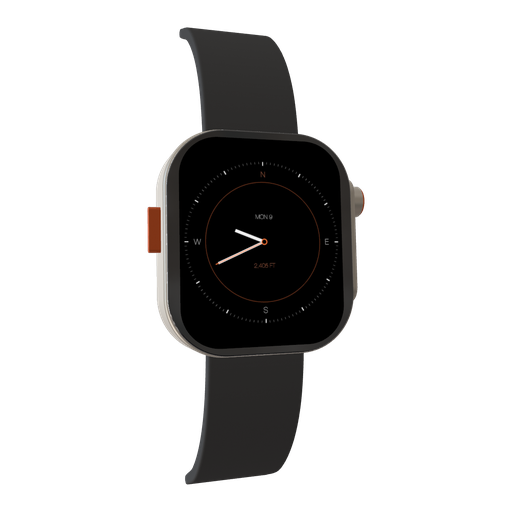
Watch apps are almost impossible to demo with a raw screenshot — 422 × 514 pixels of UI floating on a white page tells nobody anything. Put that same screenshot on a 3D Apple Watch Ultra 3 with its titanium case, the Action button and a strap catching the light, render it at 4K, and suddenly a complication looks like a product. OpenMock's Ultra 3 is fully modelled and rotates like the phones.
Apple Watch Ultra 3 screen specs you need for a clean mockup
| Display | Always-On Retina LTPO3 OLED, wide-angle |
| Native resolution | 422 × 514 px |
| Aspect ratio | ≈0.82:1 (portrait rectangle with rounded corners) |
| App Store screenshot slot | Apple Watch Ultra 3 — 422 × 514 (required for watchOS apps; one size across all localizations) |
| App Store preview video | Not offered for watchOS |
Watch screenshots are tiny and Apple wants them exact: 422 × 514 for the Ultra 3, with other models at 410 × 502, 396 × 484 or 368 × 448. Because the panel is so small, a 3D render of the watch at 4K is what makes a watchOS feature legible in marketing — the store screenshot itself stays at native size.
How to make an Apple Watch Ultra 3 mockup (about two minutes)
- Open OpenMock in a desktop browser. There is no account and no upload — your files stay on your machine.
- In the Mockup panel pick Apple Watch Ultra 3. The watch is small in world units — zoom the camera in until the case fills the frame before framing.
- Drag a screenshot or a screen recording onto the canvas. Capture on the watch itself or from the simulator at 422 × 514; the rounded-corner mask is applied by the model.
- Set the canvas ratio in the top bar — 1:1 for feed posts and 9:16 for Reels; the watch composes naturally in a square.
- Frame it: pan, zoom, tilt and roll the camera, and tilt the case a few degrees so the crown and Action button are both visible. Choose a background (solid, gradient, image or blurred image) and a lighting environment (Studio, Concrete or Dark Room).
- Export. Image gives you PNG, JPEG or WebP at any preset or custom size — transparent PNG included — free forever. Video renders an MP4 with motion blur and optional audio.
Turning the Apple Watch Ultra 3 into a promo video
Watch videos live or die on scale: viewers need to see the UI, so hold a tight, nearly straight-on shot for most of the clip and use a short orbit only as the opener or closer. A screen recording from the watch (or the simulator) showing a workout starting or a complication updating is worth more than any camera move. Keep motion blur low.
Video exports are free up to 720p at 30 fps with a small watermark. Pro ($5/month or $36/year) removes the watermark and unlocks 4K and 60 fps, plus project save/open so you can come back to a scene later.
Where an Apple Watch Ultra 3 mockup works best
- watchOS feature marketing where a 422 × 514 screenshot alone is unreadable
- Health, fitness and outdoor apps — the Ultra's rugged case is on-brand
- Companion-app scenes: watch next to an iPhone 17 Pro to show syncing
- App Store preview images for the iPhone companion app that mention the watch feature
Tips that make Apple Watch Ultra 3 renders look real
- Use a high-contrast watch face or UI; small screens need bold elements at marketing sizes
- The Concrete environment adds warmth to the titanium; Dark Room makes the OLED pop
- Frame tight — a watch at arm's length in a 4K frame is a dot
- For store screenshots stay at native 422 × 514 with no device frame; save the 3D render for ads and social
FAQ
Is the Apple Watch Ultra 3 mockup free?
Yes. Image exports (PNG, JPEG, WebP, including transparent PNG) are free with no signup and no watermark. Video exports are free at up to 720p/30 fps with a watermark; Pro removes it and unlocks 4K and 60 fps.
What resolution should my Apple Watch Ultra 3 screenshot be?
Match the native display, 422 × 514 px, or any image with the same aspect ratio (≈0.82:1 (portrait rectangle with rounded corners)). OpenMock scales and fits the screen automatically, so a slightly different size still works — just avoid upscaling small captures.
Can I use a screen recording instead of a screenshot?
Yes. Drop an MP4 or MOV (including HEVC recordings straight from an iPhone or Mac) onto the Apple Watch Ultra 3; the recording plays on the screen and you can trim it, change its speed and animate the camera around it before exporting an MP4.
Can OpenMock export the required 422 × 514 Apple Watch screenshots?
You should upload the raw watch capture for the store — Apple wants the app UI at native size. Use OpenMock for the marketing versions: 3D renders at any size, or a custom-size export that frames the watch for ads and social.
Does the Apple Watch Ultra 3 mockup include the strap?
Yes — case, Digital Crown, Action button and strap are modelled, and the whole watch rotates so you can show the crown side or the button side.