 OpenMock Blog
Device mockups
iPhone 17 Pro Max mockup: 3D images and videos in your browser
Put a screenshot or recording on a 3D iPhone 17 Pro Max and export PNG or MP4 — free, no signup, nothing uploaded. Specs, steps and store sizes.
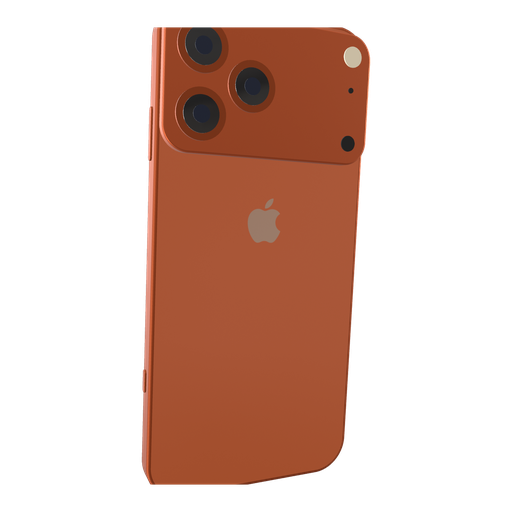
The iPhone 17 Pro Max is the device most app teams reach for first: it is the flagship, it is what reviewers photograph, and its 6.9-inch display is the size Apple requires for App Store screenshots. OpenMock's iPhone 17 Pro Max is a procedural 3D model — camera plateau, flat titanium edge, Dynamic Island and all — built from scratch in three.js, so it renders at any resolution without a blurry texture in sight.
iPhone 17 Pro Max screen specs you need for a clean mockup
| Display | 6.9-inch Super Retina XDR, ProMotion |
| Native resolution | 1320 × 2868 px (portrait) |
| Aspect ratio | ≈19.5:9 |
| App Store screenshot slot | 6.9-inch — 1320 × 2868 (the required iPhone set) |
| App Store preview video | 886 × 1920 portrait or 1920 × 886 landscape, 15–30 s |
The Pro Max is the one iPhone whose native resolution is also Apple's required screenshot size, so a full-resolution capture drops straight into the 6.9-inch slot. In OpenMock, export the framed marketing version at a custom size of 1320 × 2868 and you have a store-ready file.
How to make an iPhone 17 Pro Max mockup (about two minutes)
- Open OpenMock in a desktop browser. There is no account and no upload — your files stay on your machine.
- In the Mockup panel pick iPhone 17 Pro Max. The Pro Max sits between the 17 Pro and the iPad Pro in the device list; the finish selector switches between the launch colours.
- Drag a screenshot or a screen recording onto the canvas. A native 1320 × 2868 screenshot fills the display exactly; recordings from iOS Screen Recording (HEVC .mp4/.mov) play directly.
- Set the canvas ratio in the top bar — 9:16 for social clips, the App Store · iPhone preset for store-shaped canvases, or 16:9 when the phone shares the frame with text.
- Frame it: pan, zoom, tilt and roll the camera, and use the flap control to spin the phone toward the camera so the camera plateau catches the light. Choose a background (solid, gradient, image or blurred image) and a lighting environment (Studio, Concrete or Dark Room).
- Export. Image gives you PNG, JPEG or WebP at any preset or custom size — transparent PNG included — free forever. Video renders an MP4 with motion blur and optional audio.
Turning the iPhone 17 Pro Max into a promo video
The Pro Max rewards slow moves. A 6-second push-in with a few degrees of tilt reads as premium; a fast whip pan reads as a template. Keep the phone filling 60–70% of a 9:16 frame, add a text shot for the headline, and let a screen recording carry the motion. Motion blur on low keeps UI text crisp while smoothing the camera.
Video exports are free up to 720p at 30 fps with a small watermark. Pro ($5/month or $36/year) removes the watermark and unlocks 4K and 60 fps, plus project save/open so you can come back to a scene later.
Where an iPhone 17 Pro Max mockup works best
- App Store 6.9-inch screenshots — the required set every iOS app must ship
- Hero images and launch tweets where you want the current flagship, not last year's phone
- App preview and Product Hunt videos where a slow orbit around the camera plateau sells the hardware as much as the app
- Landing-page headers: export a transparent PNG and drop it over your own gradient
Tips that make iPhone 17 Pro Max renders look real
- Use the Dark Room environment with screen glow on — the large 6.9-inch panel throws believable light onto the titanium frame
- Add a subtle depth-of-field so the far corner of the phone softens; it separates the device from a flat background
- For screenshots destined for the store, keep the frame straight-on or nearly so; heavy tilt hides UI reviewers want to read
- Match the status bar: capture at 9:41, full battery, full signal — Apple's own convention
FAQ
Is the iPhone 17 Pro Max mockup free?
Yes. Image exports (PNG, JPEG, WebP, including transparent PNG) are free with no signup and no watermark. Video exports are free at up to 720p/30 fps with a watermark; Pro removes it and unlocks 4K and 60 fps.
What resolution should my iPhone 17 Pro Max screenshot be?
Match the native display, 1320 × 2868 px (portrait), or any image with the same aspect ratio (≈19.5:9). OpenMock scales and fits the screen automatically, so a slightly different size still works — just avoid upscaling small captures.
Can I use a screen recording instead of a screenshot?
Yes. Drop an MP4 or MOV (including HEVC recordings straight from an iPhone or Mac) onto the iPhone 17 Pro Max; the recording plays on the screen and you can trim it, change its speed and animate the camera around it before exporting an MP4.
Can I export exactly 1320 × 2868 for the App Store from OpenMock?
Yes. Choose Custom in the export size and enter 1320 × 2868; the image exporter renders at that exact pixel size. Apple accepts JPEG or PNG without an alpha channel for screenshots, so export JPEG or a non-transparent PNG.
Is the model the real iPhone 17 Pro Max shape?
It is a procedural recreation with the 17 Pro generation's proportions, camera plateau and display corner radii, built for rendering rather than reverse-engineered from Apple files. Apple, iPhone and related marks belong to Apple Inc.; OpenMock is independent.