 OpenMock Blog
Device mockups
MacBook Neo mockup: 3D images and videos in your browser
Put a screenshot or recording on a 3D MacBook Neo and export PNG or MP4 — free, no signup, nothing uploaded. Specs, steps and store sizes.
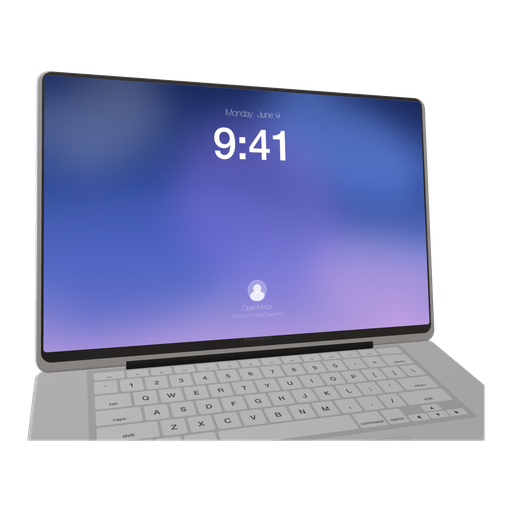
The MacBook Neo is the laptop for the next wave of Mac users: students, first-time Mac owners, people who bought it because it was finally affordable. If that is your audience, showing your app on a Neo instead of a $2,500 Pro is a small, honest signal. OpenMock added it soon after launch as a distinct procedural model — the lighter chassis, the different lid proportions — not a relabelled Pro.
MacBook Neo screen specs you need for a clean mockup
| Display | 13.0-inch Liquid Retina, LED-backlit IPS |
| Native resolution | 2408 × 1506 px |
| Aspect ratio | 16:10 |
| Mac App Store screenshots | 16:10 — 1280 × 800, 1440 × 900, 2560 × 1600 or 2880 × 1800 |
| Mac App Store preview video | 1920 × 1080, 15–30 s |
Released in March 2026 as Apple's entry-level MacBook, the Neo has a 16:10 display like the Pro models, so the same screenshots and store assets fit. The lower pixel count is irrelevant for mockups — OpenMock renders the screen from your capture at whatever export size you choose.
How to make a MacBook Neo mockup (about two minutes)
- Open OpenMock in a desktop browser. There is no account and no upload — your files stay on your machine.
- In the Mockup panel pick MacBook Neo. The Neo is the newest model in the list; its colour finishes are brighter than the Pro's.
- Drag a screenshot or a screen recording onto the canvas. 2408 × 1506 native, or any 16:10 capture from a larger Mac scaled to fit.
- Set the canvas ratio in the top bar — 16:9 for most uses; 9:16 with the laptop turned three-quarters works for Reels aimed at students.
- Frame it: pan, zoom, tilt and roll the camera, and use the lid control to open it to about 100°. Choose a background (solid, gradient, image or blurred image) and a lighting environment (Studio, Concrete or Dark Room).
- Export. Image gives you PNG, JPEG or WebP at any preset or custom size — transparent PNG included — free forever. Video renders an MP4 with motion blur and optional audio.
Turning the MacBook Neo into a promo video
Lean into the Neo's personality: a colourful gradient background, the Studio environment, a lively but short camera move, and a screen recording of the app doing something in a couple of seconds. Education and consumer software on a Neo should feel quick and light, not cinematic — keep clips under 15 seconds and motion blur on low.
Video exports are free up to 720p at 30 fps with a small watermark. Pro ($5/month or $36/year) removes the watermark and unlocks 4K and 60 fps, plus project save/open so you can come back to a scene later.
Where a MacBook Neo mockup works best
- Education, note-taking and student-focused apps
- Consumer Mac apps whose buyers own entry-level hardware
- Colourful social campaigns — the Neo's finishes carry a brand palette
- "Runs on any Mac" messaging next to a MacBook Pro in the same scene
Tips that make MacBook Neo renders look real
- Bright finish plus a light UI plus Studio lighting: the cleanest combination for this device
- Keep effects off except a touch of depth of field — the Neo's look is simple by design
- Frame it slightly closer than a Pro; the smaller lid needs to fill the frame to read as a laptop
- For feature announcements, a two-shot (Neo, then close-up on the screen) is enough
FAQ
Is the MacBook Neo mockup free?
Yes. Image exports (PNG, JPEG, WebP, including transparent PNG) are free with no signup and no watermark. Video exports are free at up to 720p/30 fps with a watermark; Pro removes it and unlocks 4K and 60 fps.
What resolution should my MacBook Neo screenshot be?
Match the native display, 2408 × 1506 px, or any image with the same aspect ratio (16:10). OpenMock scales and fits the screen automatically, so a slightly different size still works — just avoid upscaling small captures.
Can I use a screen recording instead of a screenshot?
Yes. Drop an MP4 or MOV (including HEVC recordings straight from an iPhone or Mac) onto the MacBook Neo; the recording plays on the screen and you can trim it, change its speed and animate the camera around it before exporting an MP4.
What is the MacBook Neo?
Apple's entry-level 13-inch MacBook, released March 11, 2026, with a 2408 × 1506 Liquid Retina display. OpenMock includes it as its own 3D model alongside the MacBook Pro 14-inch and 16-inch.
Will my MacBook Pro screenshots fit the Neo mockup?
Yes. All three MacBooks in OpenMock are 16:10, so the same capture fits each display exactly.